
Google Flights is one of the best tools to find affordable flights. It stands out from other flight search engines like Skyscanner, Hopper, and Expedia due to its powerful features. With Google Flights, you can easily compare prices from different airlines and find flights that suit your needs. Whether you’re looking for the cheapest option or the most convenient times, Google flight helps you filter and find exactly what you’re looking for.
Over time, Google Flights has introduced new features to make booking even easier. It now shows you the best times to book your flights, helping you get the best deal. You can also search for Google Flights for Southwest Airlines, which was previously missing from the platform. In addition, you can now book train tickets, making Google Flights even more versatile. One of the most useful new features is the ability to exclude basic economy fares, ensuring you only see flights that offer more comfort and flexibility.
With all these updates, Google Flights is a must-use tool for booking your next trip. It offers real-time price updates and even helps you track prices with alerts. The new Flight Deals feature, powered by AI, makes it even easier to find great offers for your travel. Whether you’re planning a short getaway or a long vacation, Google Flights makes the process easier, faster, and more affordable.
What are Google Flights?
Google Flights is a free, user-friendly flight search engine developed by Google. It allows travelers to compare flight options from over 300 airlines and online travel agencies, helping them find the best deals and plan their trips efficiently. Unlike traditional booking sites, Google Flights doesn’t handle bookings directly but redirects users to the airline or travel agency’s website to complete the purchase.
One of its standout features is the ability to search for flights from multiple nearby airports simultaneously, increasing the chances of finding cheaper options. The platform also offers an interactive calendar and price graph, enabling users to identify the most affordable travel dates. Additionally, Google Flights provides filters to sort results by factors like number of stops, airlines, and travel times, allowing for a more tailored search experience.
For those with flexible travel plans, the “Explore” feature is particularly useful. It displays a map showing flight prices to various destinations, helping travelers discover affordable locations they might not have initially considered. Moreover, Google Flights includes a price tracking tool that notifies users when flight prices change, ensuring they can book at the most opportune time.
Step-by-step guide on how to use Google Flights
Google Flights is an easy and efficient tool to find the best flight options. Here’s a step-by-step guide to help you get started with booking your next trip.

Step 1: Visit Google Flights
Open your web browser and go to Google Flights.
Step 2: Enter Your Travel Details
- Departure City: Type your city or airport code (e.g., Lahore, ISB).
- Destination: Enter your destination or leave it blank to explore options.
- Dates: Select your travel dates or choose flexible dates to see a range of prices.
- Passengers & Class: Choose the number of passengers and preferred cabin class (Economy, Business, etc.).
Step 3: Use the Calendar to Find the Cheapest Dates
- After entering your details, Google Flights will display a calendar showing the lowest prices for each day.
- Green dates indicate the cheapest options.
- Click on your preferred dates to proceed.
Step 4: Explore Flight Options
- Best vs. Cheapest: Toggle between “Best” and “Cheapest” tabs to compare flights based on comfort or cost.
- Filters: Use filters to narrow down results by airline, number of stops, baggage policies, and more.
Step 5: Use the Explore Map (Optional)
- If you’re flexible with your destination, click on the “Explore” tab.
- Enter your departure city and travel dates to see a map with flight prices to various destinations.
- This feature helps you discover affordable travel options you might not have considered.
Step 6: Track Prices for Fare Alerts
- Once you’ve selected a flight, click the “Track prices” button to receive email notifications if the fare changes.
- This feature helps you monitor prices and book when the fare is at its lowest.
Step 7: Select and Book Your Flight
- Click on your chosen flight to view details.
- Google Flights will redirect you to the airline’s website or an online travel agency to complete the booking.
- Ensure all details are correct before finalizing your purchase.
Tips for Getting the Best Deals
- Be Flexible: Adjust your travel dates or consider nearby airports to find cheaper options.
- Set Alerts: Use price tracking to get notified of fare changes.
- Book Early: Generally, booking in advance can help secure better prices.
Using the Explore tool to find affordable trips
Google Flights’ Explore tool is a fantastic way to discover affordable travel destinations, especially if you’re flexible with your plans. It allows you to see a map of flight prices from your location to various destinations, helping you find the best deals without having a specific place in mind.
How to Use Google Flights Explore
Access the Explore Tool:
- Visit Google Flights Explore.
Set Your Preferences:
- Departure City: Enter your home airport or city.
- Dates: Choose specific dates or select flexible options like “Weekend” or “2 weeks”.
- Travel Mode: Opt for “Flights only” to focus solely on air travel.
- Filters: Use filters to specify preferences such as trip duration, number of stops, airlines, and baggage policies.
Explore the Map:
- The map will display various destinations with corresponding flight prices.
- Click on a destination to view detailed flight options and choose the one that fits your budget and schedule.
Book Your Flight:
- Once you select a flight, Google Flights will redirect you to the airline’s website or an online travel agency to complete the booking.
The latest updates that improve the Google Flights experience
Google Flights has introduced several new features to enhance the travel planning experience, making it more user-friendly and cost-effective. Here’s an overview of the latest updates:
Cheapest Tab for Budget Travelers
Launched in October 2024, the “Cheapest” tab allows users to find the lowest-cost itineraries, even if they involve longer layovers, multiple airlines, or different airports. This feature helps travelers prioritize savings over convenience.
AI-Powered Flight Deals
Introduced in August 2025, the Flight Deals tool uses AI to understand natural language queries like “week-long trip this winter to a city with great food, nonstop only.” It then provides matching affordable travel options, simplifying the search process for flexible travelers.
Basic Economy Fare Filter
To help travelers avoid restrictive basic economy fares, Google Flights now offers a filter to exclude these options from search results. This feature is currently available for flights within the U.S. and Canada.
Expanded Airport and Airline Coverage
Google Flights has expanded its search capabilities to include more airports and airlines, such as Southwest Airlines, which were previously excluded. This expansion provides travelers with a broader range of options and potentially better deals.
Enhanced Date Grid and Price Graph
The Date Grid and Price Graph features have been improved to help users identify the cheapest days to fly. These tools display fair variations over a calendar view, making it easier to plan trips around the most affordable dates.
How to set alerts to track changes in flight prices
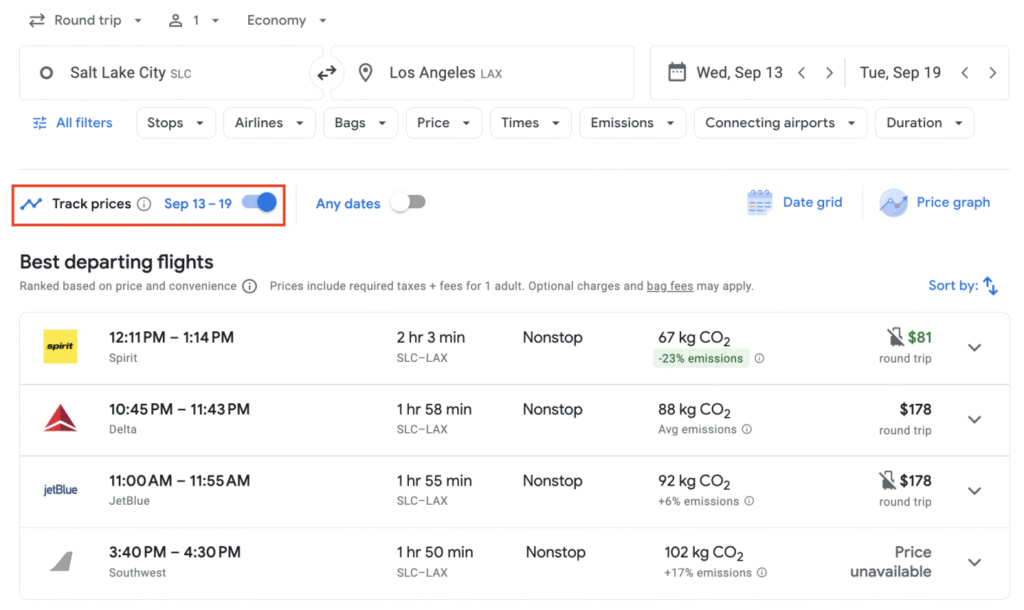
Setting up price alerts on Google Flights is a straightforward way to monitor fare changes for your desired routes. Here’s how you can do it:
Visit Google Flights
- Navigate to Google Flights.
Enter Your Travel Details
- Input your departure and destination cities.
- Select your travel dates or choose flexible dates if you’re open to various options.
- Adjust filters such as number of stops, cabin class, and number of passengers to refine your search.
Activate Price Tracking
- Once your search results appear, look for the “Track prices” toggle, usually located at the top of the page.
- Switch this toggle to the “on” position.
- Ensure you’re signed into your Google account to receive notifications.
Customize Your Alerts
- If your travel dates are flexible, you can select the “Any dates” option to receive alerts for price changes across a broader timeframe.
- For specific flights, click on the desired flight option and then activate the price tracking for that particular route.
Manage Your Alerts
- To view or modify your tracked flights, click on the menu icon (three horizontal lines) in the top-left corner of the Google Flights page.
- Select “Tracked flight prices” to see all your active alerts.
- Here, you can edit or remove alerts as needed.
📧 Receiving and Managing Notifications
- Email Alerts: Google will send you email notifications when there’s a significant change in the price of your tracked flight.
- Mobile Notifications: If you’re using the Google Flights mobile app, ensure push notifications are enabled to receive timely updates.
💡 Tips for Effective Price Tracking
- Flexibility: Being flexible with your travel dates can increase the chances of finding lower fares.
- Multiple Alerts: Set up alerts for different routes or date combinations to compare prices and find the best deal.
- Regular Checks: Even with alerts set, periodically check Google Flights to stay updated on fare trends.
By following these steps, you can effectively monitor flight prices and book when fares are at their most favorable.
Google Flights helps you spot the best flight deals
Google Flights is a powerful tool that helps travelers find the best flight deals by offering a range of features designed to compare prices, explore flexible options, and track fare changes. Here’s how you can leverage its capabilities to secure affordable flights:

Compare Flight Options with ‘Best’ and ‘Cheapest’ Tabs
Google Flights displays search results in two tabs:
- Best: Prioritizes flights that offer a balance between price, convenience, and ease of booking.
- Cheapest: Focuses on the lowest fares, which may involve trade-offs such as longer layovers or multiple airlines.
This dual-tab system allows you to choose flights based on your priorities, whether that’s minimizing cost or maximizing convenience.
Explore Flexible Destinations with the ‘Explore’ Tool
If you’re open to various destinations, the ‘Explore’ feature lets you input your departure city and view a map displaying flight prices to different locations. This is particularly useful for spontaneous trips or when you have a general idea but no specific destination in mind.
Utilize Date Grid and Price Graph for Optimal Booking
The Date Grid and Price Graph tools help you identify the cheapest days to fly. By displaying fare variations over a calendar view, you can select travel dates that offer the best prices.
Set Up Price Alerts to Monitor Fare Changes
Google Flights allows you to track specific flights by enabling price alerts. Once activated, you’ll receive notifications via email when there’s a significant change in the fare, helping you book at the most opportune time.
Leverage AI-Powered’ Flight Deals’ for Personalized Suggestions
The ‘Flight Deals’ feature uses AI to understand your travel preferences and suggest affordable options accordingly. You can describe your ideal trip in natural language, and the tool will provide matching deals, making it easier to find budget-friendly flights.
Price Guarantee: Get a Refund if Prices Drop
Google Flights makes it easy to find the best flight deals through a simple and powerful search tool. You can use Google Flights to search for flights anywhere around the world, whether you’re looking for domestic trips or international adventures. With Google Flights search anywhere, you can explore various destinations and see flight prices to different cities, even if you’re unsure where you want to go. This flexibility helps you find the most affordable options without being tied to one destination. Flights Google also offers great filters, allowing you to sort flights by price, duration, number of stops, and more, so you can find exactly what you need.
In addition to offering competitive prices, Google Flights has a Price Guarantee feature for select flights. This means if the price of your flight drops after booking, flight Google will refund you the difference, giving you peace of mind. You can easily track your flights through Google Flights and get alerts if prices change, making it easier than ever to book flights at the best rates. Whether you’re booking a last-minute trip or planning ahead, Google flight provides all the tools you need to find and book your flights with confidence.
How to use Thrifty Traveler Premium to find low-cost flights

Thrifty Traveler Premium is a subscription service that helps travelers find and book low-cost flights by providing timely alerts for flight deals, including mistake fares and discounted business class tickets. By subscribing, you gain access to exclusive flight deal notifications tailored to your home airport, allowing you to book directly with airlines and save significantly on airfare.
To maximize your savings with Thrifty Traveler Premium, consider the following steps:
- Set Your Home Airport(s): Upon subscribing, specify your home airport(s) to receive relevant flight deals. You can also add other airports to broaden your options.
- Monitor Your Inbox: Thrifty Traveler’s team continuously searches for flight deals and sends alerts directly to your email. These alerts include details and booking instructions for each deal.
- Book Promptly: Flight deals can expire quickly. When you receive an alert for a deal that interests you, follow the provided instructions to book directly with the airline as soon as possible.
By utilizing Thrifty Traveler Premium, you can access a curated selection of flight deals, saving both time and money on your travel bookings.
A list of airlines that are not available on Google Flights
While Google Flights is an extensive flight search engine, it doesn’t include all airlines in its listings. Some carriers, especially low-cost or regional airlines, may not appear on Google flight due to factors like distribution agreements or operational choices. Notable airlines that often don’t show up on flights Google include Southwest Airlines, which prefers to keep its flights off third-party platforms. Travelers must book directly via Southwest.com for their low fares and free checked bags.
Some airlines, like Air China, China Eastern, and Thai Airways, are not always available on Google Flights. These major Asian airlines may have limited listings or irregular availability. Additionally, Garuda Indonesia and Air Sinai, which operates flights between Egypt and Israel, also don’t consistently appear on Google Flights. Other airlines, such as AtlasGlobal, which stopped flying in 2020, and Bonza, an Australian budget airline, are not listed on Google Flights at all.
If you’re looking for flights from these airlines, you can use alternative platforms like Alternative Airlines, which offers a broader range of over 600 airlines. You can also visit the airline’s official website directly or use other flight search engines like Skyscanner, Kayak, or ITA Matrix for a more complete list of airlines and their available flights.
FAQs
How do you change your search currency?
To change the Currency displayed on Google Flights:
- On Desktop – Scroll to the bottom of the Google Flights page.
- Click on the Currency drop-down menu.
- Select your preferred Currency from the list.
This will update the Currency for all your flight searches.
How do you search for flexible dates on Google Flights?
To find flights with flexible dates:
- Go to Google Flights.
- Enter your departure city and destination.
- Click on the Dates field.
- Select Flexible dates or choose a specific time frame, like Weekend or Next month.
- Google Flights will display a calendar showing the lowest fares within your selected period. (Google Support, FlyFairTravels)
How to book a flight on Google Flights?
To book a flight:
- Visit Google Flights.
- Enter your departure city, destination, and travel dates.
- Browse the available flight options.
- Click on your preferred flight.
- You’ll be redirected to the airline’s website or an online travel agency to complete the booking.
When did Google Flights start?
Google Flights was launched in September 2011 as part of Google’s travel services. It was developed to help users find and book flights directly through Google’s platform.
How to get 50% off on a flight?
To get 50% off on a flight:
- Look for airlines offering promotional codes.
- For example, Frontier Airlines has offered 50% off base fares with promo code SAVE50. Check their deals page for current offers.
Note: Discounts typically apply to base fares and may exclude taxes and fees. (Skiplagged, Frontier Airlines)
Is there a trick to get cheaper flights?
Yes, here are some tips to find cheaper flights:
- Be Flexible: Use Google Flights’ flexible date feature to find the lowest fares.
- Set Price Alerts: Enable price tracking to get notified when fares drop.
- Book in Advance: Booking 1-3 months ahead for domestic and 2-6 months for international flights can help secure better prices.
- Use Incognito Mode: Searching in incognito mode can prevent price increases based on your search history. (New York Post, The Times of India)
Which is the best site for flight booking?
The best site depends on your needs:
- Google Flights: Great for comparing prices and finding flexible dates.
- Skyscanner: Offers a wide range of airlines and travel agencies.
- Kayak: Provides comprehensive search options and price alerts.
- Momondo: Known for finding hidden deals and budget airlines. (TechRadar)